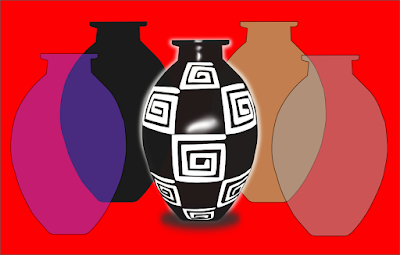
The purpose of the task was to exercise different tools Inkscape. Below
comment how it works:
1) I imported the image below.
comment how it works:
1) I imported the image below.
 2) Draw a red rectangle on a new layer. I painted "the same color" as the background of the image imported.
 The figures cited (initial image and rectangle) were in different layers. Color to make them "equal" does the following:
- left open the padlock of the two layers (the color you want to copy and the image we want painting.) If there are more layers you have to "close" the padlock of them all.
- is selected with the corresponding tool, the image you want to paint.
- are closed "all" eyes "least" of the layer having the desired color. Take the eyedropper (clicking on it), then click above the color you want to copy. Ready, They open the eyes of both layers and is painted the color figure took the dropper.
3) Then I drew the vase with the tool for Bezier curves, the shape suits you working with nodes and handles them. The painted in black color copying the original with the "dropper" again.
 4) After I added the forms that decorate the vase also working with the tools previously detailed.
  5) To make the white reflection bordering the vase duplicated it and I took the black color of the filling. After the stroke was painted white, it thickens and accommodation.
 6) The Shadow of the floor of the vase I did draw an ellipse, I painted black and the blur.
7) The light that is reflected in the center of the vase and made up the drawing and "blurring" small pieces of white figures (some have more than one bit overlay).
 8) Finally the vases that are front and back of the black vase realized by copying and pasting in different layers, the first pitcher I drew. I changed the fill color and you got the "opacity."

I hope you like it done. Health and safety
exercising.


 Oriole, the Venezuelan-flavored Twitter client now supports languages. Currently available in English and English, but with this simple guide can encourage you to translate into any language. It is very simple and need not know anything about programming xD
  here
here  should not translate the text is in English, the translation is always the bottom line and keeping the quotes
  You Do not Have to translate the text in Inglés, the translation always goes in the line Below the quotation marks and Maintaining