TIDSL103 - Playing with the tools: stars and polygons - spirals These are the figures that I made with the tool "
create stars and polygons." To give them different ways varié values:
corner radius length and roundness displayed on the tool bar. Then I painted them. The observed down in the middle, I painted choosing among the possibilities that the square that says "
pattern" window fill and stroke.
Then it occurred to me to place an image in the center and turned to the advice we gave Ana to use a piece of a given image.
who view the right (picture below) is the image I chose to draw from it only apple. The left is the one made, with Inkscape.
remember the steps: Insert
- the image. Keep it
- selected and go to Object / Pattern / Pattern Objects
- Make a rectangle with the tool Draw Bezier curves and straight line s .
- Select it with the cursor and right click. Select Fill and Stroke and click ... Locate the option
- pattern in the window that opens. (Is a box filled with rombitos) and click ... Now
- drag the nodes and / or create new , as needed, around the piece of figure we want to use.
Here is the link with detailed explanation
da Ana Here are other examples of what can be done with the stars.
The following was made with the tool create spirals. "
I worked
values \u200b\u200bvarying around, divergence and internal radio displayed on the tool bar. Then I painted
Observe
also take the opportunity to use the tool to enter text.
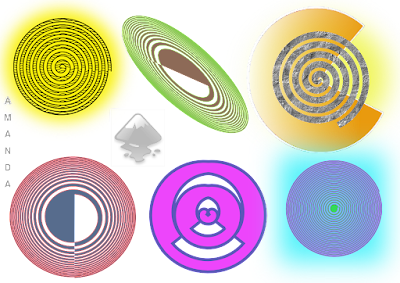
Here again the apple.

I leave the following screen to observe the tool bar "to create spiral" in which parameters are achieved.
I have noticed that there are infinite possibilities offered by the two tools
cited. The task was fun!
Greetings to all. Keep in touch.


